
Case Study
Baya Furniture Ecommerce Demo
A full-stack furniture ecommerce demo pairing a merchandising-rich storefront with a dedicated CMS for catalog, content, orders, promotions, media, and page composition.
Client
VinhWeb
Industry
Furniture & homeware
Project type
Ecommerce storefront and CMS
What was built
A responsive furniture storefront at store.vinhwebapp.com and a separate operational CMS for managing the commerce and content experience.
The challenge
Connecting visual discovery with day-to-day operations
Furniture shoppers need strong visual merchandising, clear room and product pathways, useful search, and timely promotions. The team operating the store needs an equally clear system for catalog updates, editorial publishing, campaign changes, orders, media, and access—without crowding the public buying experience with administrative complexity.
The solution
A focused storefront backed by a purpose-built CMS
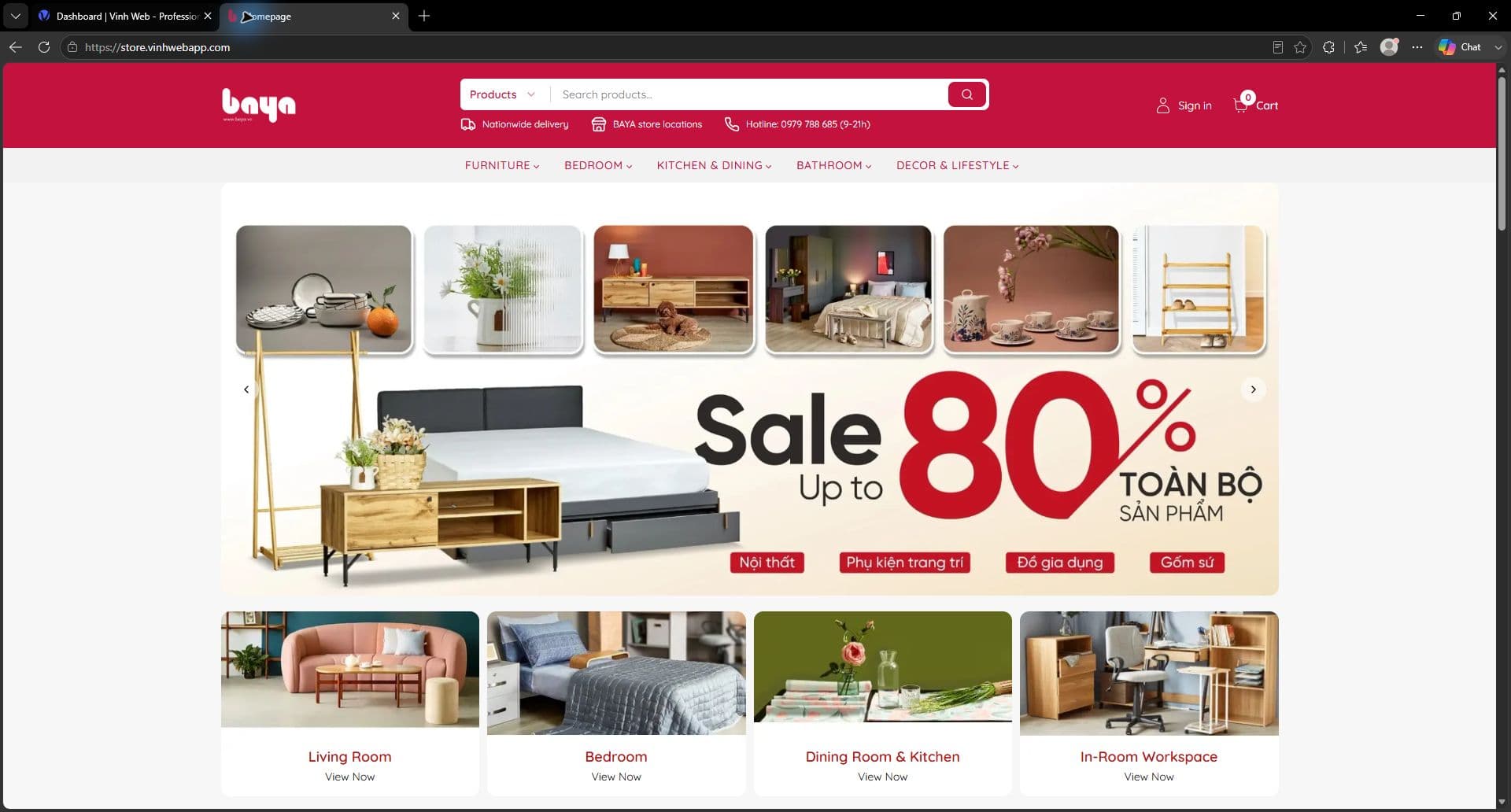
VinhWeb built a standalone Next.js storefront with room-led navigation, promotional hero campaigns, category collections, product carousels, search, editorial content, account flows, cart, and checkout. Its separate CMS provides commerce analytics and structured workflows for orders, posts, products, reviews, import and export, categories, policies, pages, forms, promotions, campaigns, media, settings, users, and permissions.
Storefront experience
From discovery to product confidence
The live storefront combines campaign-led merchandising with room-based discovery, product search, promotional collections, editorial content, and clear purchase paths.
Commerce flow
A guided path from cart to order details
The inspected purchase flow moves from navigation into a filtered collection and product detail, then through add-to-cart, shipping, order review, and payment-method selection.
Admin & management
Operations behind the storefront
The dedicated CMS brings sales visibility and operational workflows into one workspace. The inspected dashboard surfaces revenue, orders, fulfillment status, recent orders, and best sellers alongside tools for catalog, content, pages, promotions, campaigns, media, forms, settings, users, and permissions.
The screenshot below is a sanitized operational view captured from the live demo CMS; account details are excluded.
- Revenue, order, fulfillment, and best-seller reporting
- Order review and status workflows
- Products, reviews, import/export, categories, groups, and policies
- Posts, pages, videos, forms, and page-builder content
- Discount codes, discount programs, giveaways, and campaigns
- Media, redirects, contact submissions, and system settings
- Users and granular permissions
SEO, performance & architecture
Built to support a deep catalog
Separate public storefront and protected CMS applications
Server-rendered routes and structured metadata for search visibility
Shared commerce domain across catalog, promotions, customers, and orders
Reusable storefront components for campaigns, categories, and product collections
CMS-driven pages and content placements for merchandising flexibility
Permission-aware operational routes for internal workflows
Technology stack
Business value
A complete digital commerce foundation
The demo shows how a visual retail brand can combine campaign-led discovery with an operational system built around the same catalog and content model. Separating the shopper experience from the CMS keeps each interface focused, while the shared commerce foundation makes the project a practical starting point for a branded production store.
Need something similar?
Build an ecommerce platform around your business
Share your catalog, operational requirements, and growth goals. We’ll recommend the most practical starting point.
Start a Project